
Dell Pro Thunderbolt 5 Smart Dock Review and Features
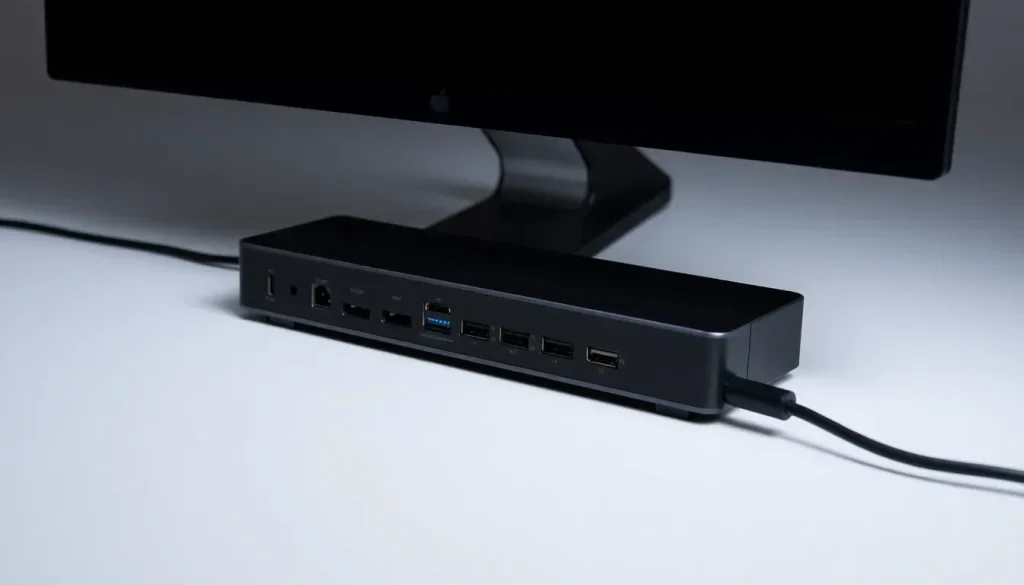
In the realm of modern computing, connectivity and versatility are crucial for maximizing productivity. The Dell Pro Thunderbolt 5 Smart Dock is designed to meet these needs with an innovative approach to port expansion and connectivity. As more devices adopt Thunderbolt technology, understanding the capabilities and advantages of such docks becomes increasingly valuable. Here, we dive into the specifications, features, and overall performance of this cutting-edge docking solution.
Comprehensive Overview of the Dell Pro Thunderbolt 5 Smart Dock
The Dell Pro Thunderbolt 5 Smart Dock is a state-of-the-art docking station that enhances the connectivity of Thunderbolt 5 systems. This device is particularly beneficial for users of high-performance laptops like the Dell Pro Max 18 Plus, providing a straightforward way to expand functionality without the clutter of multiple adapters.
At first glance, the dock features a sleek design with a variety of ports tailored for modern usage. Notably, the front panel includes:
- One USB Type-A port
- One USB Type-C port
Both ports are rated for 10Gbps, ensuring high-speed data transfer. This thoughtful labeling helps users quickly identify the capabilities of each port, addressing the confusion often associated with USB standards.
Flipping the dock over reveals additional functionality:
- Three USB Type-A ports with PowerShare capabilities
- Two Thunderbolt 5 downstream ports
- A power input for the dock
- A 2.5GbE Ethernet port, powered by a Realtek NIC
This configuration is ideal for users needing reliable wired connections alongside their USB devices, making the dock a versatile addition to any workstation.
Display Capabilities
The Dell Pro Thunderbolt 5 Smart Dock excels in display output options, catering to users who require multiple external monitors. It includes:
- One HDMI 2.1 port
- Two DisplayPort 2.1 ports
The rear Type-C port functions as a USB 3.2 Gen2 port with DisplayPort Alt mode, allowing for seamless video output. This multi-display support is particularly beneficial for professionals involved in graphic design, video editing, or data analysis, who rely on expansive screen real estate.
Notably, the dock comes equipped with a Thunderbolt 5 cable, simplifying setup by eliminating the need to purchase separate cables. This feature enhances user experience by minimizing cable management concerns.
Internal Design and Cooling Mechanisms
One of the unique aspects of the Dell Pro Thunderbolt 5 Smart Dock is its internal cooling fan, which helps maintain optimal operating temperatures. While the fan is audible, its noise level, measured at 35-36 dBA from one meter away, is generally acceptable within a quiet workspace. This design consideration ensures that the dock can handle demanding tasks without overheating.
Additionally, the dock's rubber base provides stability and prevents sliding during use. Locking points on the sides add an extra layer of security, allowing users to secure the dock in place, which is particularly useful in shared or public spaces.
Smart Features for Enhanced Functionality
The Dell Pro Thunderbolt 5 Smart Dock distinguishes itself with smart capabilities, allowing it to connect to a Wi-Fi network for remote firmware upgrades. This feature is invaluable for IT administrators managing large fleets of devices, as it simplifies maintenance and ensures that all units are up to date without requiring physical access.
The alternative model, the WD25TB5, lacks this smart functionality, catering to users who may not need such advanced features. The choice between these two models depends on individual requirements, particularly for users managing multiple devices or remote setups.
Power Requirements and Adapter Specifications
Power delivery is a critical aspect of any docking station, and the Dell Pro Thunderbolt 5 Smart Dock does not disappoint. It includes a substantial power adapter designed to support the dock and connected devices, ensuring that everything runs smoothly without power interruptions.
The power adapter specifications include:
- High wattage to support multiple devices
- Compatibility with various laptops
- Efficient power management features
This robust power supply is essential for high-performance laptops, which often require more power than standard USB connections can provide.
Compatibility and Versatility
One of the most frequently asked questions about docking stations is their compatibility with non-Dell devices. The Dell Pro Thunderbolt 5 Smart Dock is designed to work seamlessly with any Thunderbolt 5 laptop, not just those made by Dell. This compatibility opens up a world of possibilities for users who own devices from various manufacturers.
Conclusion
The Dell Pro Thunderbolt 5 Smart Dock stands out for its blend of features that cater to professionals seeking to enhance their workstation's connectivity and functionality. With support for multiple display outputs, high-speed USB ports, and smart features for remote management, this dock is a compelling choice for anyone looking to optimize their setup.
For a deeper dive into the Dell Pro Thunderbolt 5 Smart Dock, you can watch this detailed review on YouTube:


Leave a Reply